Imp Imp
← Back to Arsenal
Microsoft Teams Meeting Cost Tracker

Microsoft Teams Meeting Cost Tracker

Automation

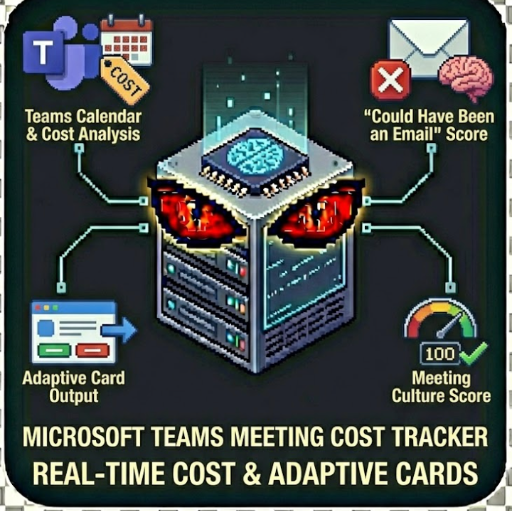
Calculate real-time meeting costs in Microsoft Teams. Analyze Teams calendar meetings, get "Could Have Been an Email" scores, and generate cost reports w/Adaptive Cards.This actor connects to Microsoft Graph API to analyze your Teams calendar "Could Have Been an Email" Score Meeting Culture Score

Microsoft Teams Meeting Cost Tracker

"Real-Time Meeting Costs in Microsoft Teams" by John Rippy | johnrippy.link
🏆 2025 Zapier Automation Hero of the YearProject Phoenix: A 95-step AI sales pipeline cutting development time by 50%. Read more →

---

Calculate real-time meeting costs in Microsoft Teams. Analyze Teams calendar meetings, get "Could Have Been an Email" scores, and generate cost reports with Adaptive Cards.

What This Actor Does

This actor connects to Microsoft Graph API to analyze your Teams calendar and provides:

Perfect For

Features

Input Examples

Demo Mode (No Credentials Required)

{

"demoMode": true,

"dateRange": "last_week",

"averageSalary": 100000

}

Real Mode with Azure AD Credentials

{

"demoMode": false,

"tenantId": "your-azure-tenant-id",

"clientId": "your-app-client-id",

"clientSecret": "your-app-client-secret",

"userEmail": "user@company.com",

"dateRange": "last_week",

"averageSalary": 120000

}

Output as Teams Adaptive Card

{

"tenantId": "...",

"clientId": "...",

"clientSecret": "...",

"userEmail": "user@company.com",

"outputFormat": "teams_card"

}

Azure AD Setup

To use this actor with real Teams data, you need to register an app in Azure AD:

1. Register Application

1. Go to Azure Portal > Azure Active Directory

2. App registrations > New registration

3. Name: "Meeting Cost Tracker"

4. Supported account types: Single tenant or Multitenant

5. Register

2. Configure API Permissions

Add these Microsoft Graph permissions (Application type):

Grant admin consent for these permissions.

3. Create Client Secret

1. Certificates & secrets > New client secret

2. Copy the secret value (you won't see it again!)

4. Get Your Credentials

Output

Full Analysis

{

"overview": {

"platform": "Microsoft Teams",

"totalMeetings": 24,

"totalHours": 42,

"totalCost": 8400,

"averageMeetingLength": 52,

"averageAttendees": 4.2,

"currency": "USD"

},

"meetingCultureScore": {

"overall": 58,

"breakdown": {

"focusTime": 45,

"asyncSuitability": 62

}

},

"asyncCandidates": [

{

"subject": "Weekly Status Update",

"duration": 60,

"attendees": 8,

"cost": 384,

"emailScore": 82,

"recommendation": "Consider replacing with Teams chat, Loop component, or email"

}

],

"recommendations": [

{

"priority": "high",

"action": "Convert \"Weekly Status Update\" to async",

"potentialSavings": 268,

"rationale": "Email score of 82%, 8 attendees"

}

],

"potentialSavings": 2100

}

Teams Adaptive Card

Perfect for posting to Teams channels:

{

"type": "AdaptiveCard",

"version": "1.4",

"body": [

{

"type": "TextBlock",

"text": "📊 Meeting Cost Report",

"weight": "bolder",

"size": "large"

},

...

],

"actions": [

{

"type": "Action.OpenUrl",

"title": "View Full Report",

"url": "https://meeting.localhowl.com"

}

]

}

Use Cases

1. Weekly Team Reports

Post meeting cost summaries to a Teams channel:

const result = await apifyClient.actor("localhowl/teams-meeting-cost-tracker").call({

tenantId: process.env.AZURE_TENANT_ID,

clientId: process.env.AZURE_CLIENT_ID,

clientSecret: process.env.AZURE_CLIENT_SECRET,

userEmail: "team-lead@company.com",

dateRange: "last_week",

outputFormat: "teams_card"

});

// Post to Teams webhook

await fetch(TEAMS_WEBHOOK_URL, {

method: 'POST',

headers: { 'Content-Type': 'application/json' },

body: JSON.stringify(result.adaptiveCard)

});

2. Organization-Wide Audit

Analyze multiple users' calendars:

const users = ["alice@co.com", "bob@co.com", "carol@co.com"];

const results = [];

for (const user of users) {

const result = await apifyClient.actor("localhowl/teams-meeting-cost-tracker").call({

tenantId: "...",

clientId: "...",

clientSecret: "...",

userEmail: user,

dateRange: "last_month"

});

results.push({ user, ...result });

}

// Aggregate insights across the organization

3. Power Automate Integration

Trigger weekly reports via Power Automate:

1. Create a scheduled flow (weekly)

2. Add HTTP action to call Apify API

3. Post Adaptive Card to Teams channel

"Could Have Been an Email" Score for Teams

The Email Score (0-100) predicts how likely a meeting could be handled via Teams chat, Loop, or email:

Factors That Increase Score:

Factors That Decrease Score:

Privacy & Security

Related Tools

Support

---

Author

Built by John Rippy | johnrippy.link
🏆 2025 Zapier Automation Hero of the YearProject Phoenix: A 95-step AI sales pipeline cutting development time by 50%. Read more →
Part of the Meeting Cost Tracker productivity suite by LocalHowl
149,000
KILLS
100%
HEALTH
Doomguy
274
ACTORS
0/3
SECRETS